Energy and plans
What energy is, how much each plan gives, what is unlimited and how to manage or cancel your subscription.
What energy is
Energy measures the work the AI does for each answer: a short question uses little; a long answer, with many tools or with Deep thinking, uses more. That is why Orbit does not promise a fixed number of messages: what counts is the energy you have left.
Only the chat uses energy. Everything else is unlimited (see below).
The plans
| Plan | Energy | Renews |
|---|---|---|
| Free | 616 energy per week | Every Monday at 00:00 UTC |
| Individual Pro | 12,000 per 3-day block | 3 days after the block opens |
| Individual Max | 96,000 per 3-day block (8 times Pro), plus Deep thinking | 3 days after the block opens |
Free. The week's energy comes back in full every Monday at 00:00 UTC. There is no daily limit: you can spend it all in one afternoon or spread it over the week.
Pro and Max. They work in 3-day blocks: a block starts with your first question and renews 3 days later; the next question opens a new, full one. Energy you don't use does not carry over. Pro gives about 45 times Free's energy; Max, 8 times Pro's, and adds Deep thinking, which reasons more thoroughly and uses more.
When it runs out
- Below 15% the interface warns you.
- When it reaches zero, the chat stops until renewal and Orbit tells you when it comes back.
- If an answer costs more than you had left, it is still completed; the next question waits for renewal. The debt does not carry over to the next period.
- Every plan has a reasonable hourly usage limit and one answer at a time per account.
What is unlimited
- The calculators (combat, missiles, expeditions, flight, trade).
- The map, Empire and report imports, memory and plans.
- Alliance chat between people.
- Player scanning: on Free, one of each type every 7 days; unlimited with Pro, Max or an alliance seat.
Extra energy
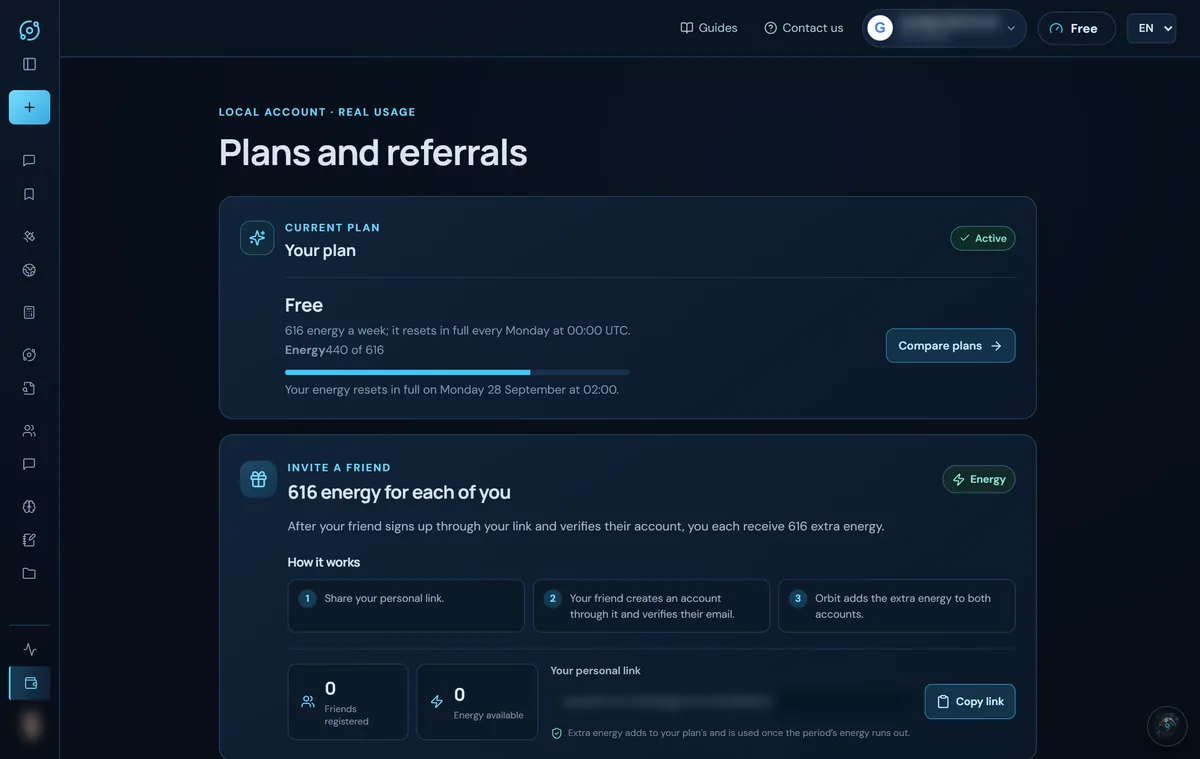
- Invite a friend: when your friend signs up with your link and verifies their account, you each receive 616 energy. It is used once your period's energy runs out.
- Alliance seats: the energy of each active seat adds to your plan's (see Alliances).
Where to see your energy
The indicator in the top bar shows what you have left. Clicking it (or Invite a friend, at the bottom of the menu) opens Plans and referrals, with your plan, your energy, the renewal date and your invitation link.
Manage or cancel your subscription
- To compare or subscribe, click Compare plans or open the pricing page.
- With a paid plan, Manage or cancel subscription appears; it opens the payment portal to change your card or cancel. The pricing page also has Manage my subscription.
- When you cancel, you keep the plan until the end of the paid period.
- Alliance seats are managed from their space (Cancel this seat).
If subscriptions are not open yet, the pricing page says so.
Screenshots show the English interface with sample data; player names are fictitious.